


BLOG
How to Add AI to Your Existing Website or Software
4 min read
A cybersecurity agency helps businesses protect their systems, data, and operations from cyber threats. This guide explains the services they provide, how they work, and how to determine whether your organisation could benefit from professional cybersecurity support.
Adding artificial intelligence to a website or software system sounds expensive, complicated, and something only large technology companies can do. The reality in the current landscape is quite different. Through APIs — application programming interfaces — businesses of every size can now connect powerful AI capabilities directly to their existing systems without rebuilding anything from scratch and without a team of machine learning researchers. A marketing platform can gain AI-generated copy. An e-commerce store can gain intelligent product search. A customer support system can gain a 24/7 conversational assistant. All of it through integration, not replacement.
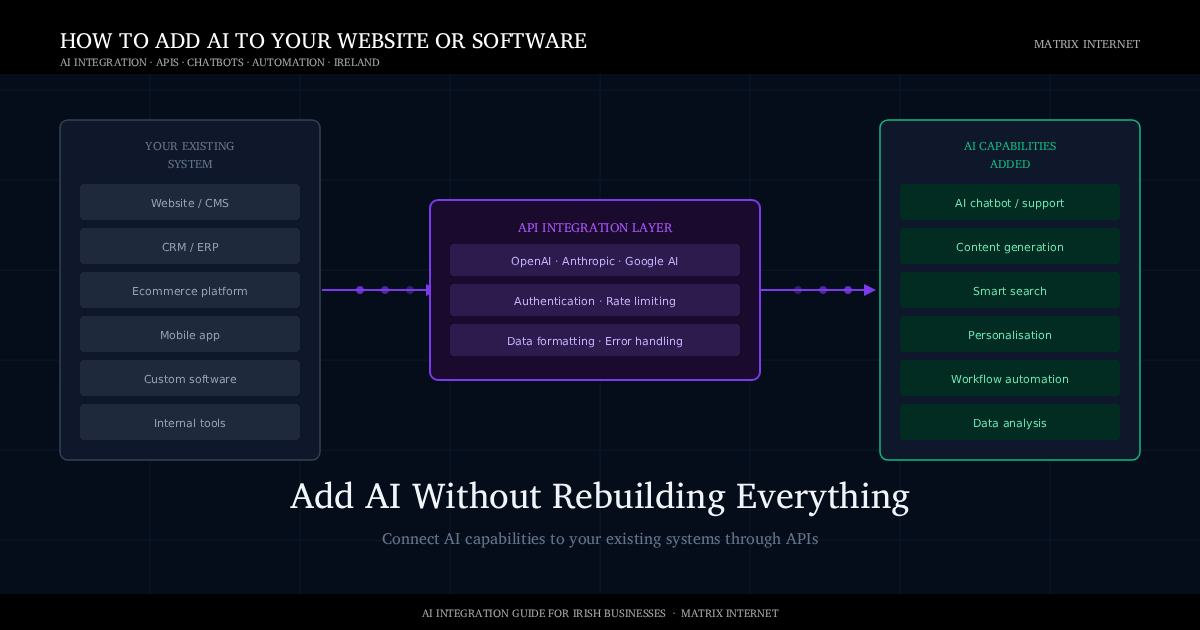
This guide explains what AI integration actually means in practical terms, the six most valuable ways to add AI to an existing system, how to choose the right approach for your budget and technical context, and what the implementation process looks like from brief to launch.
What AI Integration Actually Means
AI integration is the process of connecting an AI capability — language understanding, image recognition, prediction, and generation — to a system that was not originally built with AI. Rather than building a new AI model from the ground up (which requires enormous data, expertise, and investment), integration uses existing AI services accessed via API.
An API is essentially a connection point. When your system sends data to an AI provider’s API — a customer question, a product description, a document — the AI processes it and returns a result — an answer, a summary, a recommendation. Your system displays or acts on that result. The AI does the heavy processing; your system handles the interface and the workflow.
This approach means that businesses can access the same underlying AI technology used by the world’s largest companies — OpenAI’s GPT models, Anthropic’s Claude, Google’s Gemini — through pay-as-you-use API access, at a cost that scales with usage rather than requiring upfront infrastructure investment.
According to McKinsey’s State of AI report, businesses that have implemented AI in at least one business function report meaningful improvements in efficiency and cost reduction. The businesses achieving these results are not exclusively large enterprises — API-based integration has made meaningful AI implementation accessible at every scale.
Six Ways to Add AI to Your Website or Software
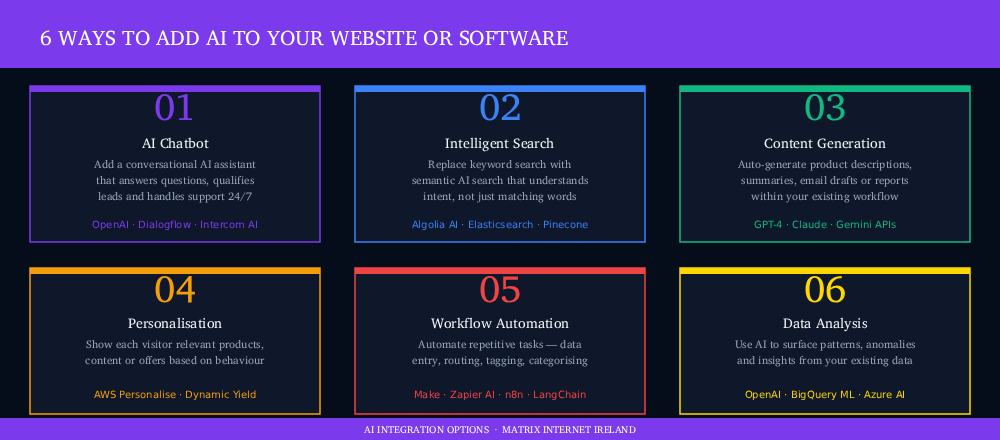
1. AI Chatbot and Conversational Assistant
An AI chatbot connects a large language model to your website or application, enabling visitors or users to ask questions in natural language and receive accurate, contextual answers. Unlike the rule-based chatbots of previous generations — which followed rigid decision trees and broke the moment a user asked something outside the script — modern AI chatbots understand the intent behind questions, handle ambiguity, and generate genuine responses rather than selecting from pre-written options.
For businesses, the most valuable implementations go beyond FAQ deflection. A chatbot trained on your product catalogue can guide customers through purchasing decisions. One trained on your documentation can handle technical support queries. One integrated with your CRM can qualify leads and book meetings. The key distinction between a generic chatbot and an effective one is the quality of the data it is given access to — a chatbot that knows your business answers questions about your business; a generic chatbot answers generic questions.
The implementation involves connecting an API (typically OpenAI’s GPT-4o or Anthropic’s Claude) to a chat interface on your site, providing it with relevant context about your business through a system prompt or retrieval mechanism, and embedding the interface into your site or application. For more complex implementations — where the chatbot needs access to live data such as order status, inventory, or account information — a retrieval-augmented generation (RAG) architecture connects the language model to your databases in real time.
2. Intelligent Search
Standard keyword search is brittle. A user searching for “affordable running shoes for beginners” on a site whose product descriptions use “entry-level” and “budget” will get poor results, because keyword search matches words, not meaning. AI-powered semantic search understands the intent behind a query and returns relevant results even when the exact words do not match.
For ecommerce sites, this is one of the highest-ROI AI integrations available. Algolia’s research consistently shows that improved search relevance reduces bounce rates and increases conversion. Users who find what they are looking for buy more. Users who cannot find it leave.
Implementation typically involves either replacing the existing search engine with an AI-native one (Algolia, Elasticsearch with vector search, or a purpose-built semantic search API) or augmenting an existing search system with embedding-based retrieval. Your product or content data is processed into vector embeddings — mathematical representations of semantic meaning — which can be compared against query embeddings to find the most conceptually similar results rather than the most lexically matching ones.
3. AI Content Generation
Content generation does not mean replacing your writers with AI. It means using AI to handle the repetitive, structured content tasks that consume disproportionate time: writing product descriptions at scale, drafting email subject line variations, generating summaries of long documents, producing first drafts of reports from data, or auto-populating templates with contextually relevant text.
An ecommerce business with ten thousand products cannot write individual, optimised descriptions for each one manually. With AI integration, a product’s attributes — name, category, specifications, materials — are sent to a language model API with a prompt specifying the desired tone, length, and format. A high-quality draft description is returned in seconds. Human review ensures quality; AI handles volume.
The same principle applies to internal content: meeting summaries, status reports, customer email drafts, social media variants from a blog post. These are tasks where AI provides the first 80% of the effort and a human provides the final 20% of judgment and refinement — a division that is significantly more efficient than either doing it entirely manually or publishing AI output without review.
4. Personalisation
AI personalisation means showing each user the content, products, or recommendations most relevant to their individual context — based on their browsing behaviour, purchase history, stated preferences, or inferred interests. The underlying technology uses machine learning models to identify patterns across large numbers of users and apply those patterns to predictions about what any individual user is most likely to engage with.
At its simplest, this is a recommendation engine — “customers who viewed this also viewed…” At its most sophisticated, it is dynamic pricing, individually tailored email content, and website layouts that rearrange themselves based on the visitor’s likely intent. The inputs are your existing customer and behavioural data; the output is a more relevant experience that reduces friction between interest and purchase.
Services like Amazon Personalize and Dynamic Yield make recommendation and personalisation infrastructure accessible through APIs, without requiring a data science team to build and maintain the underlying models.
5. Workflow Automation
AI workflow automation connects language models or specialist AI tools to the repetitive processing tasks inside your business systems — classifying incoming customer support tickets by category and priority, extracting structured data from unstructured documents, routing enquiries to the right team member based on content, or generating follow-up actions from meeting transcripts.
Tools like Make (formerly Integromat), n8n, and Zapier now include native AI steps that can be inserted into workflow automation pipelines — allowing non-developers to add AI processing to existing automations without writing code. For more complex implementations, frameworks like LangChain and LlamaIndex provide the scaffolding for building AI agents that can execute multi-step processes autonomously.
6. Data Analysis and Insight Generation
AI can be connected to your existing data — sales records, customer feedback, operational logs, support tickets — to surface patterns, anomalies, and insights that would take a human analyst days to identify. Rather than a static dashboard requiring manual interpretation, an AI layer can answer natural language questions about your data: “Which product category had the most returns last quarter and what was the most common reason?” or “Which customer segment shows the highest churn risk based on recent behaviour?”
This is typically implemented either through a RAG architecture that gives a language model access to your structured data, or through specialist business intelligence tools that have integrated AI query layers — including Google BigQuery ML, Azure AI Services, and similar cloud data platforms.
Choosing Your Approach: Build, Buy, or API
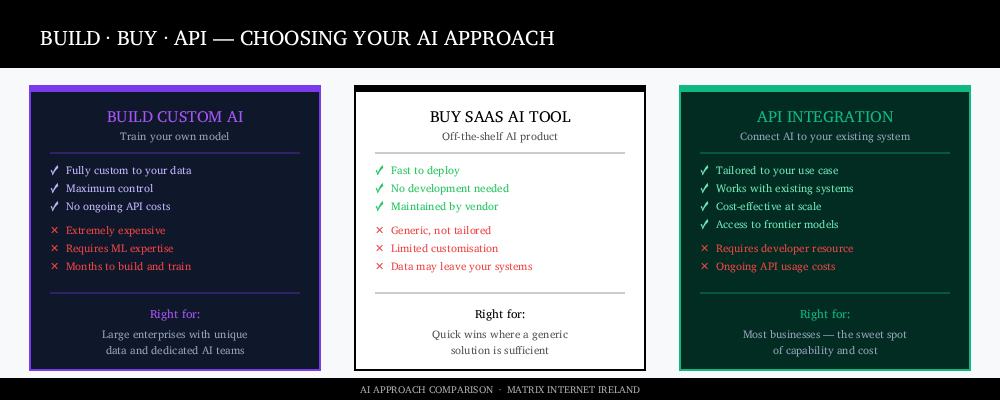
Before starting any AI integration project, it is worth understanding the three fundamental approaches and which is right for your situation.
Building a custom AI model — training your own model on your own data — is appropriate for very large organisations with proprietary data assets that no existing model can replicate, and the engineering resources to build and maintain it. For the vast majority of businesses, it is prohibitively expensive, slow, and unnecessary. The frontier models available through APIs already outperform what most organisations could build independently.
Buying an off-the-shelf SaaS AI tool — an existing product with AI features built in — is the fastest route to deployment but the least flexible. These tools are designed for broad use cases and may not fit your specific workflow, data structure, or integration requirements. They are appropriate when your use case is generic and the vendor’s implementation closely matches your needs.
API integration — connecting an AI provider’s models to your existing system through their API — is the approach that offers the best balance of capability, customisation, and cost for most businesses. You access frontier-level AI without the cost of building it, and the integration is tailored to your specific system, data, and use case. This is the approach that the Matrix Internet AI integration team delivers for clients across Ireland and Europe.
What the Integration Process Looks Like
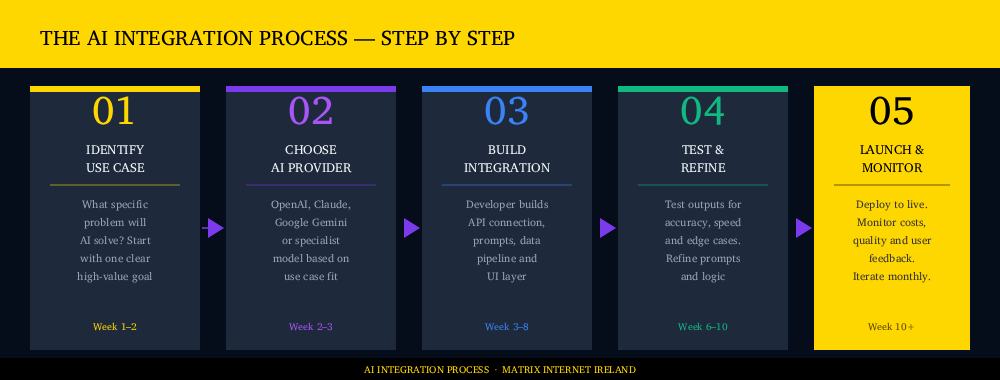
Step 1: Define the use case precisely
The most common mistake in AI integration projects is starting with “we want to add AI” rather than “we want to solve this specific problem with AI.” The first framing leads to unfocused projects with unclear success criteria. The second leads to integrations that deliver measurable results.
A useful use case definition answers four questions: What specific task will AI perform? What data does it need to perform it? How will the output be used? How will we measure whether it is working? A chatbot that “handles customer queries” is vague. A chatbot that “answers questions about our product returns policy and reduces the volume of returns-related support emails by routing them without human intervention” is a defined, measurable integration.
Step 2: Select the AI provider and model
Different AI models have different strengths. GPT-4o from OpenAI performs strongly across general language tasks and has broad multimodal capability. Claude from Anthropic performs particularly well on nuanced reasoning, long-document tasks, and applications where response reliability and safety are priorities. Google’s Gemini integrates tightly with Google’s data and productivity ecosystem. Specialist models exist for specific tasks — code generation, image analysis, speech-to-text, translation — and often outperform general-purpose models on their target task.
Provider selection also involves practical considerations: pricing structure (per token, per call, per user), data privacy policies (whether your data is used for training, where it is processed and stored), rate limits, availability, and latency. For business applications involving customer data, the data processing and storage location of your AI provider needs to align with your GDPR obligations.
Step 3: Build the integration
The integration development work connects your existing system to the AI API. At minimum, this involves: writing the API calls that send data from your system and receive the AI response, designing the prompt or context that gives the AI the information it needs to perform its task, handling errors and edge cases, and building the interface through which users interact with the AI capability.
More complex integrations — particularly those involving RAG for knowledge base access, or agentic systems that execute multi-step tasks — require additional architecture work: vector databases to store embeddings, retrieval pipelines to find relevant context, orchestration logic to manage multi-step reasoning, and tool-use implementations that allow the AI to take actions in other systems.
Step 4: Test and refine
AI integrations require a different testing approach from traditional software. In addition to functional testing (does the API call succeed?), you need to evaluate output quality: is the AI response accurate, appropriate, and useful across a representative range of inputs? Does it handle unusual or adversarial inputs gracefully? Is the latency acceptable for the user experience? Are the costs per interaction within the expected range?
Prompt engineering — refining the instructions and context given to the AI model — is a significant part of this phase. The same underlying model can produce substantially better or worse results depending on how it is prompted, and finding the optimal prompt for your specific use case typically requires iteration and testing across a meaningful sample of real-world inputs.
Step 5: Launch, monitor and iterate
After launch, AI integrations need ongoing monitoring in ways that traditional software does not. Model providers release new versions that may behave differently from the version you built against. Your input data changes over time as your business evolves. User behaviour reveals edge cases that did not appear in testing. API costs need to be tracked against the value being generated.
The most effective AI integrations are treated as continuously improving systems rather than set-and-forget deployments — reviewed regularly, updated as better models become available, and expanded as the initial use case proves its value and appetite grows for additional AI capabilities.
Practical Considerations for Irish Businesses
GDPR and data privacy. Any AI integration that processes personal data about EU residents — including your customers — must comply with GDPR. This affects which AI providers you can use (their data processing agreements must be GDPR-compliant), where data is stored and processed (EU data residency may be required for certain data types), and whether personal data is being used to train AI models (most major providers allow you to opt out of training data use). These requirements should be established at the design stage, not retrofitted after build.
Enterprise Ireland support. Irish businesses investing in digital transformation including AI integration may be eligible for Enterprise Ireland grants and supports. The Matrix Internet grants and schemes team advises businesses on available funding and helps structure projects to qualify.
Start with one use case. The businesses that achieve the most value from AI integration are those that start with a single, well-defined use case, prove its value, and expand from there. Attempting to implement AI across multiple systems simultaneously typically results in delayed delivery, higher costs, and lower quality outcomes than a phased approach.
Summary
Adding AI to your existing website or software does not require rebuilding your systems, training your own model, or hiring a team of machine learning engineers. Through API integration, businesses of any size can connect frontier AI capabilities — language understanding, generation, search, personalisation, and automation — directly to their existing systems in weeks rather than months.
The six most valuable entry points are AI chatbots, intelligent search, content generation, personalisation, workflow automation, and AI-powered data analysis. Of these, the highest ROI for most businesses is typically a conversational AI assistant or enhanced search — both of which address clear, measurable problems and deliver visible results quickly.
The critical success factors are a well-defined use case, the right choice of AI provider for that use case, a technically sound integration built with GDPR compliance in mind, and a commitment to ongoing monitoring and iteration after launch.
If you are exploring AI integration for your business — whether you want to understand what is possible, scope a specific use case, or move directly to implementation — the AI integration team at Matrix Internet works with businesses across Ireland and Europe to design and build integrations that deliver real, measurable results. Get in touch to discuss what AI could do for your system.
At Matrix Internet, our AI integration team helps businesses add intelligent capabilities to their existing websites and software — designing the right use case, building the API connection, and delivering a working integration that creates real, measurable value.
FAQs
No — in most cases you do not need to change your existing system at all. AI capabilities are added through API integration, which connects an AI provider's models to your website or software through a standardised interface. Your existing system sends data to the AI, receives a processed result, and displays or acts on it. The underlying platform stays intact. Whether your site runs on WordPress, a custom CMS, or a bespoke software system, AI can typically be layered on top through integration rather than replacement.
Costs vary significantly depending on the complexity of the integration and the AI provider used. A straightforward chatbot integration using an API like OpenAI might involve a few days of development work plus ongoing API usage costs that scale with the volume of queries — often a few cents per conversation. A more complex integration involving retrieval-augmented generation, custom data pipelines, or multi-step AI agents will involve more development time and architecture work. The most important framing is to compare the integration cost against the value it delivers — a chatbot that handles two hundred support queries a month that would otherwise require staff time pays for itself quickly. We scope every project individually to give you an accurate estimate before any work begins.
It can be, provided the integration is designed correctly with GDPR compliance built in from the start. The key considerations are: choosing an AI provider whose data processing agreements are GDPR-compliant, ensuring customer personal data is not being used to train AI models without proper consent, understanding where your data is processed and stored (EU data residency may be required for certain data types), and implementing appropriate access controls so the AI only has access to the data it actually needs. These requirements should be established at the design stage rather than addressed after the integration is built. Any AI integration we build for clients is scoped with GDPR compliance as a baseline requirement, not an afterthought.
A rule-based chatbot follows a fixed decision tree — if the user says X, show response Y. It can only handle questions it has been explicitly programmed for, and it breaks the moment a user phrases something differently or asks something outside the script. An AI chatbot uses a large language model to understand the intent behind a question and generate a contextual response, even when the phrasing is unexpected or the question is complex. It can handle nuance, follow-up questions, and ambiguous inputs. The practical difference for a business is significant — a rule-based chatbot deflects simple FAQs, while an AI chatbot can genuinely resolve queries, qualify leads, guide purchasing decisions, and handle support conversations that would otherwise require a human agent.
By Matrix Internet


