


BLOG
Broken links: How to find and fix them?
4 min read
Matrix is proud to join PACE, now launched in Moldova. The Erasmus+ project strengthens youth organisations across the region with training, digital resources and collaboration to support displaced Ukrainian young people.
Every website accumulates broken links over time. Pages get deleted, URLs change after a redesign, external websites go offline, and content gets moved without proper redirects in place. Left unchecked, broken links quietly damage your search engine rankings, frustrate your visitors, and undermine confidence in your brand. The good news is that finding and fixing them is straightforward once you know where to look and which tools to use.
This guide covers what broken links are, why they matter, how to find every type on your website, and how to fix each one correctly.
What Is a Broken Link?
A broken link is any hyperlink that leads to a page or resource that no longer exists or cannot be reached. When a visitor or search engine crawler follows a broken link, they receive an error response — most commonly a 404 Not Found — instead of the expected content.
Broken links fall into two main categories:
- Internal broken links — links within your own website that point to pages you have deleted, moved, or renamed without setting up a redirect
- External broken links — links on your website that point to pages on other websites that have since been removed, restructured, or taken offline
There are also broken image links (images that no longer load because the file has been deleted or moved), broken links in navigation menus, and redirect chains or loops where a link goes through multiple hops before reaching its destination — or never reaches one at all.
Why Broken Links Matter
Search engine rankings
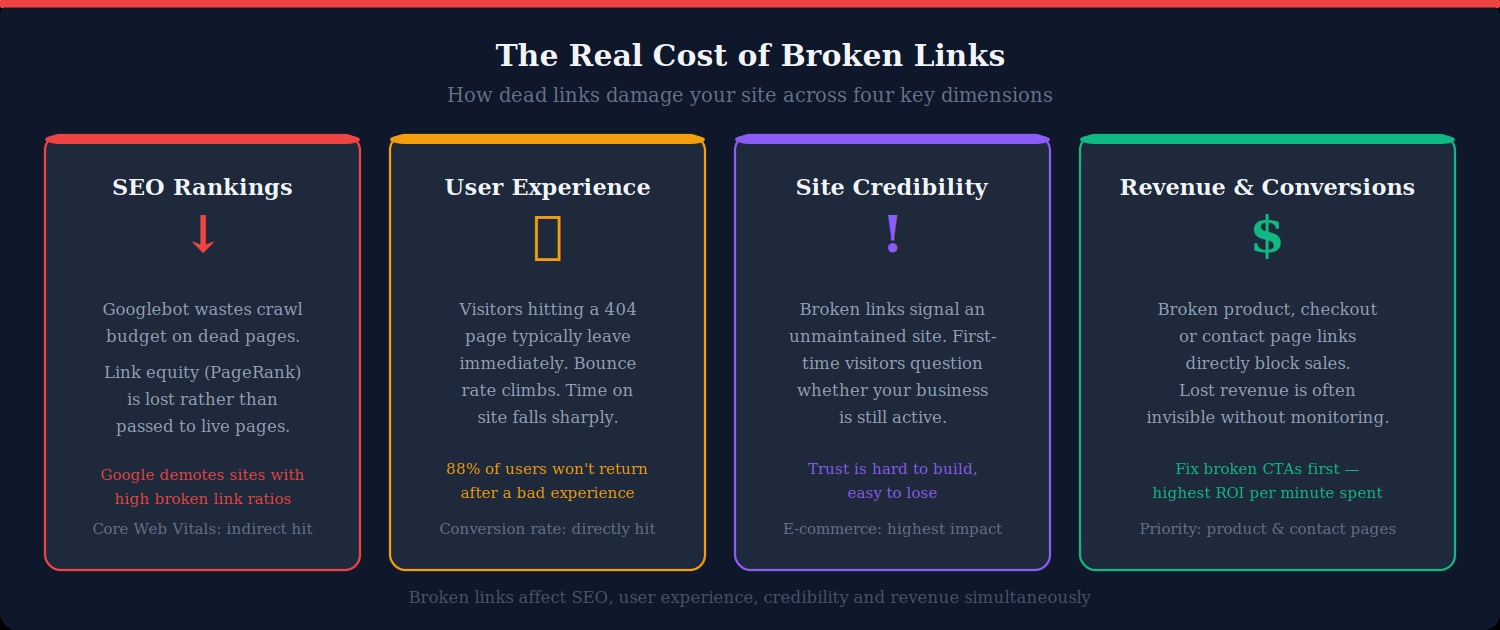
When Googlebot crawls your website and encounters broken links, it wastes crawl budget — the limited number of pages Google will crawl per visit — on dead ends rather than your actual content. More significantly, internal broken links interrupt the flow of link equity (PageRank) through your website. A page that would normally pass authority to other pages instead passes it nowhere. Over time, a website with many broken links signals poor maintenance to search engines, which can result in lower rankings across your entire domain.
User experience and bounce rate
A visitor who clicks a link expecting useful content and instead sees a 404 error page will almost always press the back button immediately. This spikes your bounce rate, reduces time on site, and directly cuts into your conversion rate. For e-commerce websites, a broken link on a product page, checkout flow, or contact page can mean lost sales that are invisible without monitoring in place.
Site credibility and trust
A broken link signals to visitors that your website is not being actively maintained. For a first-time visitor trying to decide whether to trust your business, encountering a dead link early in their journey can be enough to send them to a competitor. This effect is amplified on professional services, legal, medical, and financial websites, where credibility is everything.
How to Find Broken Links on Your Website
Google Search Console (free — start here)
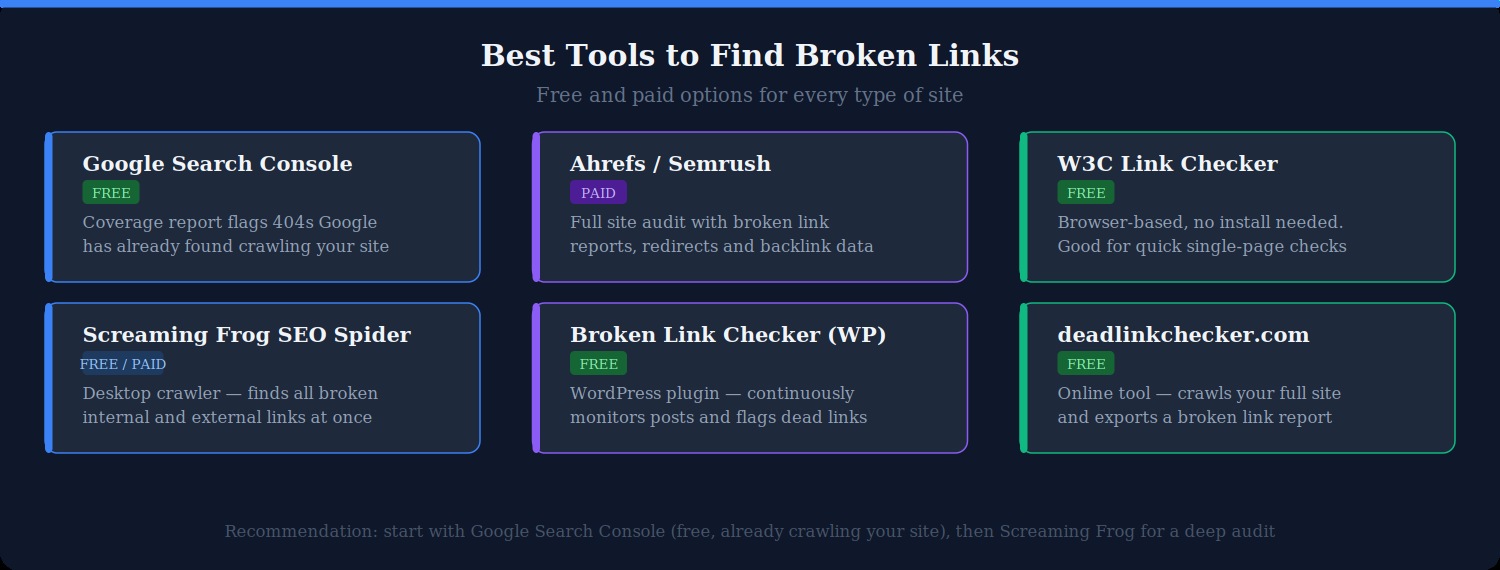
If you have Google Search Console set up for your website — and you should — it is the first place to check. Google’s own crawler has already found broken links on your website and logged them for you.
To find them: log into Search Console, go to Pages (previously called Coverage), and look for pages with a “Not found (404)” status. These are pages Google tried to crawl and got a 404 response. The report also shows you which pages are linking to these dead URLs, making it straightforward to find and fix the source links.
Screaming Frog SEO Spider (free up to 500 URLs)
Screaming Frog is a desktop application that crawls your website like a search engine and produces a detailed report of every link, image, and resource it finds. It is the most thorough tool for a full website audit.
To find broken links with Screaming Frog:
- Download and open Screaming Frog at screamingfrog.co.uk
- Enter your domain in the URL bar and click Start
- Wait for the crawl to complete (time depends on website size)
- Click the Response Codes tab and filter by Client Error (4xx)
- Every URL returning a 404 or other error will be listed, along with the pages that link to it
The free version is limited to 500 URLs. For larger websites, the paid licence costs £149 per year and is worth it for ongoing website maintenance.
Broken Link Checker plugin (WordPress)
If you run a WordPress website, the Broken Link Checker plugin (by WPMU Dev) scans your posts, pages, comments, and custom fields continuously in the background. When it finds a broken link, it sends you an email notification and flags it in the plugin dashboard.
One caveat: the plugin runs on your server and can increase resource usage on shared hosting plans. If your host runs on limited resources, consider running it for a week to do a full audit, then deactivating it and scheduling manual checks instead.
Ahrefs or Semrush (paid)
If you already subscribe to an SEO tool like Ahrefs or Semrush, both include comprehensive website audit features that identify broken links alongside other technical issues. These tools are particularly useful because they also show broken backlinks — links from other websites pointing to pages on your site that no longer exist. Reclaiming these broken backlinks (by redirecting the dead URL to a relevant live page) is one of the fastest ways to recover lost link equity.
deadlinkchecker.com (free, no install)
For a quick check without installing anything, deadlinkchecker.com crawls your website and produces a broken link report in the browser. It is a good option for a one-off audit on a smaller website, though it is less detailed than Screaming Frog or Search Console for ongoing work.
How to Fix Broken Links
Fix 1: Set up a 301 redirect (internal broken links)
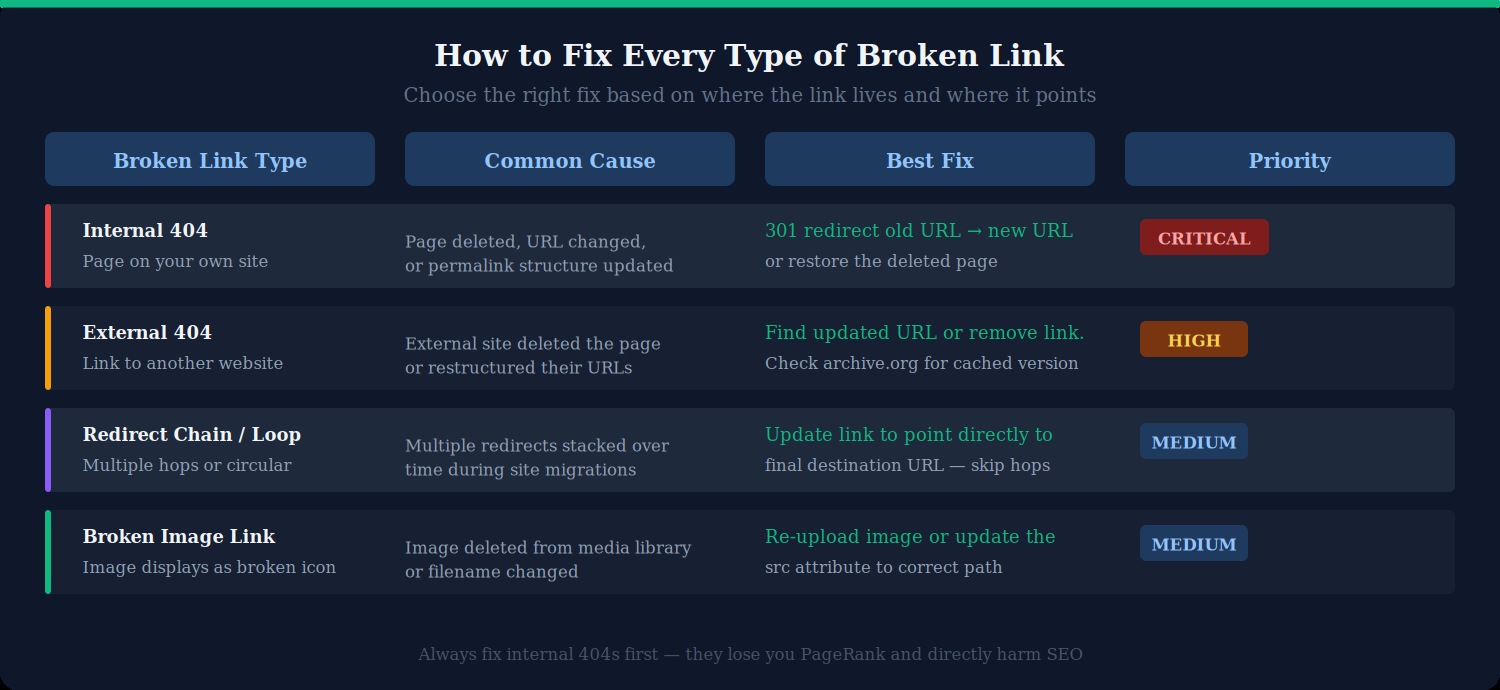
When a page on your website has moved or been deleted, and other pages still link to its old URL, the cleanest fix is a 301 permanent redirect. This tells browsers and search engines that the content has permanently moved, passing the original page’s link equity to the new destination.
On WordPress, use the free Redirection plugin by John Godley. Go to Tools → Redirection, click Add New, enter the old URL in the Source URL field and the new URL in the Target URL field, and save. The plugin handles the rest.
On Apache, add the redirect directly to your .htaccess file:
Redirect 301 /old-page-url/ https://www.yoursite.com/new-page-url/On Nginx, add it to your server block configuration:
return 301 https://www.yoursite.com/new-page-url/;Fix 2: Update the link directly
If the broken link is in a post, page, or navigation menu and the destination content still exists at a new URL, the simplest fix is to update the link directly. In WordPress:
- Open the post or page containing the broken link in the block editor
- Click the link and select the edit (pencil) icon
- Replace the old URL with the correct current URL
- Save and update the post
For broken links in navigation menus, go to Appearance → Menus, find the menu item, and update the URL there.
Fix 3: Remove or replace external broken links
When an external website you have linked to has removed or moved a page, you have three options:
- Find the updated URL — search for the content on the external website. Many websites restructure their URLs during redesigns but keep the content. If you find the new location, update your link.
- Find an equivalent source — if the original content is gone for good, find another reputable source covering the same information and link to that instead.
- Remove the link — if no equivalent exists and the link is not essential to the page’s content, simply remove it. Do not leave a broken hyperlink in place.
You can also check whether the original content was archived at web.archive.org (the Wayback Machine). If the content was archived, you can link to the archived version as a fallback, though this is generally only appropriate for referencing historical information.
Fix 4: Resolve redirect chains and loops
A redirect chain occurs when Page A redirects to Page B, which redirects to Page C. Each hop adds latency and dilutes the link equity being passed. A redirect loop occurs when two or more pages redirect to each other indefinitely, causing browsers to display a “too many redirects” error.
To fix a redirect chain, update the original link or redirect to point directly to the final destination URL, bypassing the intermediate hops. In the Redirection plugin, you can see all your existing redirects and update them. In Screaming Frog, the Redirect Chains report identifies these automatically.
Fix 5: Restore missing images
Broken image links — where an image fails to load and displays a broken icon instead — are fixed by either re-uploading the image to the correct location or updating the src attribute in the HTML to point to wherever the image now lives.
In WordPress, check your Media Library first. If the image is there but showing as broken on the page, the issue is usually that the src URL in the post editor is pointing to an old path. Edit the image block and reselect the image from the library to regenerate the correct URL.
How to Prioritise Which Broken Links to Fix First
On a large website, you may find dozens or hundreds of broken links. Fix them in this order to get the highest impact per hour of work:
- Broken links on high-traffic pages — use Google Analytics to identify your most visited pages, then check those first. A broken link on a page that gets 10,000 visits a month is far more damaging than one on a page that gets 50.
- Broken links in navigation and global elements — header navigation, footer links, and sidebar menus appear on every page of your website. A broken link here affects every visitor.
- Broken internal links on key conversion pages — contact pages, product pages, booking forms, and any page in your conversion funnel should be checked and fixed immediately.
- Internal 404s flagged by Google Search Console — Google has already noticed these and they are affecting your crawl budget right now.
- External broken links in editorial content — blog posts and articles that cite sources with broken links should be updated, particularly on high-traffic posts.
How to Prevent Broken Links in the Future
Always set up redirects when changing URLs
The single most effective way to prevent broken links is to make redirects a mandatory step in your workflow whenever you change a page URL, delete a page, or restructure your website. Before any URL changes go live, have the redirects in place. This is especially important during a website migration or CMS switch.
Use a consistent URL structure and stick to it
Frequent changes to your permalink structure create broken links at scale. Choose a URL structure when you build your site — ideally something clean and descriptive, like /blog/post-title/ — and keep it consistent. Avoid changing it unless absolutely necessary, and always redirect the old structure to the new one when you do.
Audit for broken links regularly
Set a reminder to run a Screaming Frog crawl or check Search Console’s Pages report once a month. Broken links accumulate over time as external websites change and your own content evolves. Catching them early keeps the maintenance task manageable.
Check before you publish
Before publishing any new post or page, click every link in the content to confirm it resolves correctly. This takes two minutes and prevents broken links from appearing in fresh content from day one.
Monitor backlinks to deleted pages
If you delete a page that has earned backlinks from other websites, those backlinks now point to a 404. Redirect the deleted URL to the most relevant live page on your website to recapture the link equity. Ahrefs’ Website Explorer can show you all backlinks pointing to 404 pages on your domain.
What to Do About Your Custom 404 Page
Even with excellent link maintenance, some visitors will inevitably land on a 404 page — from mistyped URLs, old bookmarks, or links on websites you cannot control. A well-designed custom 404 page can recover these visitors rather than losing them entirely.
A good custom 404 page should:
- Acknowledge that the page is not found without technical jargon
- Include your website’s navigation menu so visitors can find what they are looking for
- Offer a search bar to help them locate content
- Link to your most important pages (homepage, contact, popular posts)
- Match the design and tone of the rest of your website
In WordPress, you can create a custom 404 page using most page builders (Elementor, Divi, Beaver Builder) or by editing your theme’s 404.php template file directly.
Summary
Broken links are a maintenance issue that every website faces, but they are entirely manageable with the right tools and habits. Start with Google Search Console to find the broken links Google already knows about, run a Screaming Frog crawl for a complete audit, and work through fixes in priority order — internal 404s and high-traffic pages first. Set up 301 redirects for any moved or deleted content, update external links where possible, and build a regular monthly audit into your workflow to stay on top of new issues before they accumulate.
At Matrix Internet, our technical support team can audit your website for broken links, set up redirects, and put monitoring in place to catch issues before they affect your rankings or your visitors. Get in touch to find out how we can help.
At Matrix Internet, our technical support team helps businesses find and fix broken links quickly — auditing your site, setting up the right redirects, and putting monitoring in place to stop dead links from damaging your SEO and user experience.
FAQs
Broken links hurt your SEO in two ways. First, they waste crawl budget — when Googlebot follows a dead link, it uses up its crawl allocation on a 404 page instead of indexing your live content. Second, they interrupt the flow of link equity through your site, meaning pages that should be passing authority to other pages are passing it nowhere instead. Sites with a high number of broken links are also seen as poorly maintained, which can negatively influence how Google evaluates the overall quality of your domain.
An internal broken link points from one page on your site to another page on your site that no longer exists — typically caused by deleting a page or changing its URL without setting up a redirect. An external broken link points from your site to a page on another website that has since been removed or restructured. Both types should be fixed, but internal broken links are the higher priority because they directly affect your crawl budget, link equity,
Google Search Console is the best starting point — it is free, already crawling your site, and its Pages report shows every URL returning a 404 along with the pages linking to it. For a more thorough audit, Screaming Frog SEO Spider (free for up to 500 URLs) crawls your entire site and lists every broken internal and external link in one report. For WordPress sites, the Broken Link Checker plugin monitors your content continuously in the background and alerts you by email when new broken links are found.
A 301 redirect is a permanent redirect that automatically sends visitors and search engines from an old URL to a new one. You should use a 301 redirect any time you delete a page, change a page's URL, or restructure your site — rather than simply removing the old URL and leaving it to return a 404 error. A 301 redirect preserves the link equity (PageRank) that the original URL had built up and ensures that anyone who had bookmarked or linked to the old URL is seamlessly sent to the correct page instead.
By Matrix Internet


