


BLOG
50 Questions About App Store Submission and Approval — Answered
4 min read
Matrix is proud to join PACE, now launched in Moldova. The Erasmus+ project strengthens youth organisations across the region with training, digital resources and collaboration to support displaced Ukrainian young people.
You have built the app. It works on your phone, the team has tested it, and the launch date is in the diary. Then comes the part many businesses underestimate: getting it through Apple’s App Store review and onto Google Play. A first submission can pass in a day, or it can bounce back three times over a missing demo login, a privacy label that does not match the code, or a rule that changed last month.
This guide answers the 50 questions we hear most from Irish businesses about app store submission and approval. It covers accounts and costs, preparing your listing, testing, the review itself, rejections, updates, and the EU rules that apply to anyone publishing from Ireland.
Section 1: Accounts, Costs and Getting Set Up (Q1–10)
Q1: What do I need before I can submit an app to either store?
A developer account on each store, a finished and tested build, a privacy policy on a public URL, store listing assets (icon, screenshots, description), and answers to each store’s privacy and content questionnaires. Businesses also need a D-U-N-S number to register as an organisation. Sort the accounts first, because they take longest.
Q2: How much does it cost to publish an app?
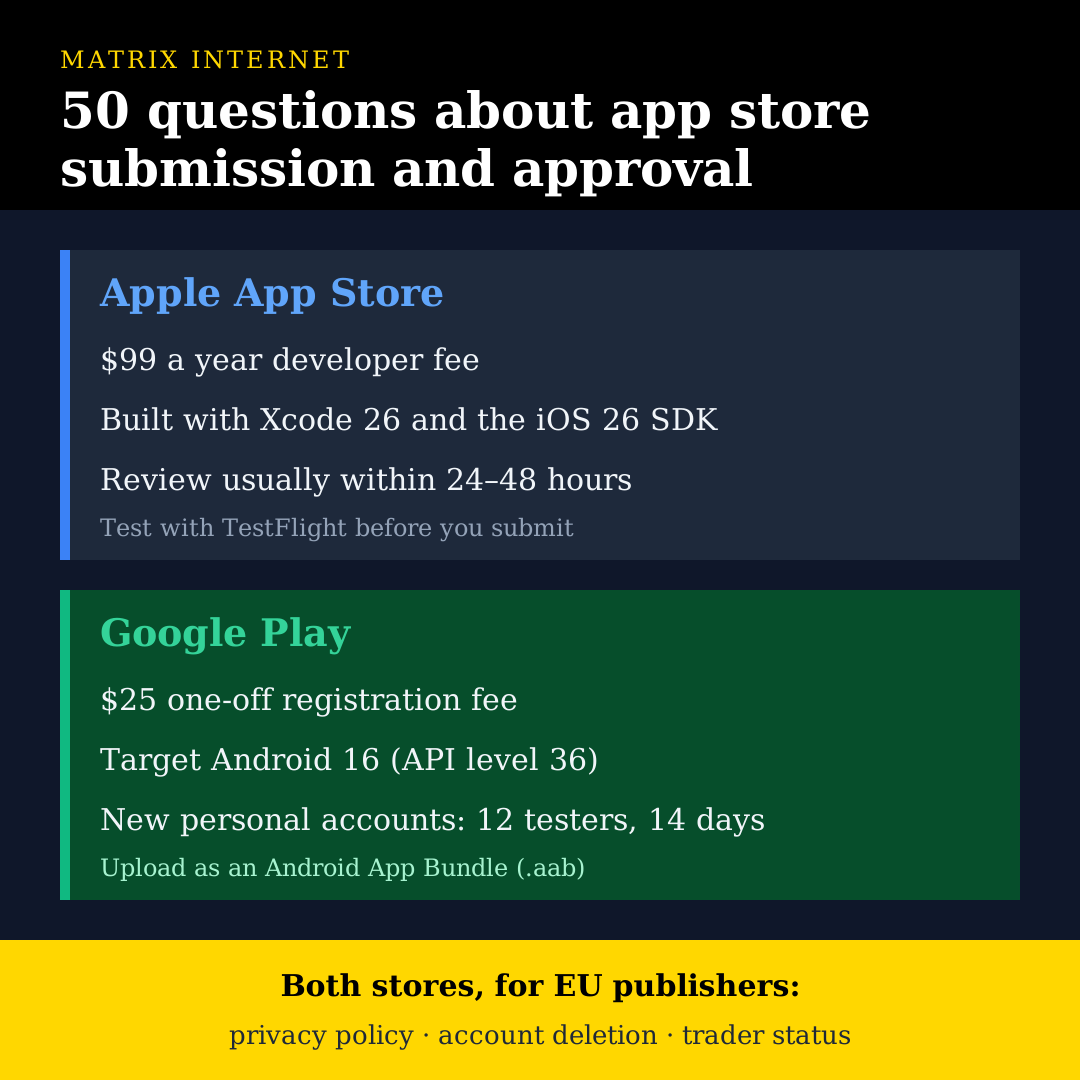
The Apple Developer Program costs $99 a year. A Google Play developer account is a one-off $25 registration fee. Neither store charges per submission or per update. The real cost of publishing is the time spent preparing listings, testing and handling review feedback.
Q3: Should I register as an individual or as an organisation?
If the app belongs to a business, register as an organisation. Your company name then appears as the seller, the account belongs to the business rather than one person, and you can add team members with different access levels. An individual account shows a personal name on the store listing and is harder to hand over later.
Q4: What is a D-U-N-S number and why do I need one?
A D-U-N-S number is a free nine-digit business identifier issued by Dun & Bradstreet. Apple and Google both use it to verify that an organisation is a real legal entity. Irish companies can look up or request one through Apple’s D-U-N-S lookup tool. Request it early. It can take up to two weeks to be issued and a few more days to reach Apple’s systems.
Q5: Who should own the developer accounts — us or our development agency?
You should. Register the accounts in your company’s name and invite your agency as team members with the permissions they need. If an agency publishes under its own account, moving the app to you later is possible but adds work and can interrupt updates. Owning the accounts from day one keeps your app, your reviews and your user base under your control.
Q6: How long does account setup take?
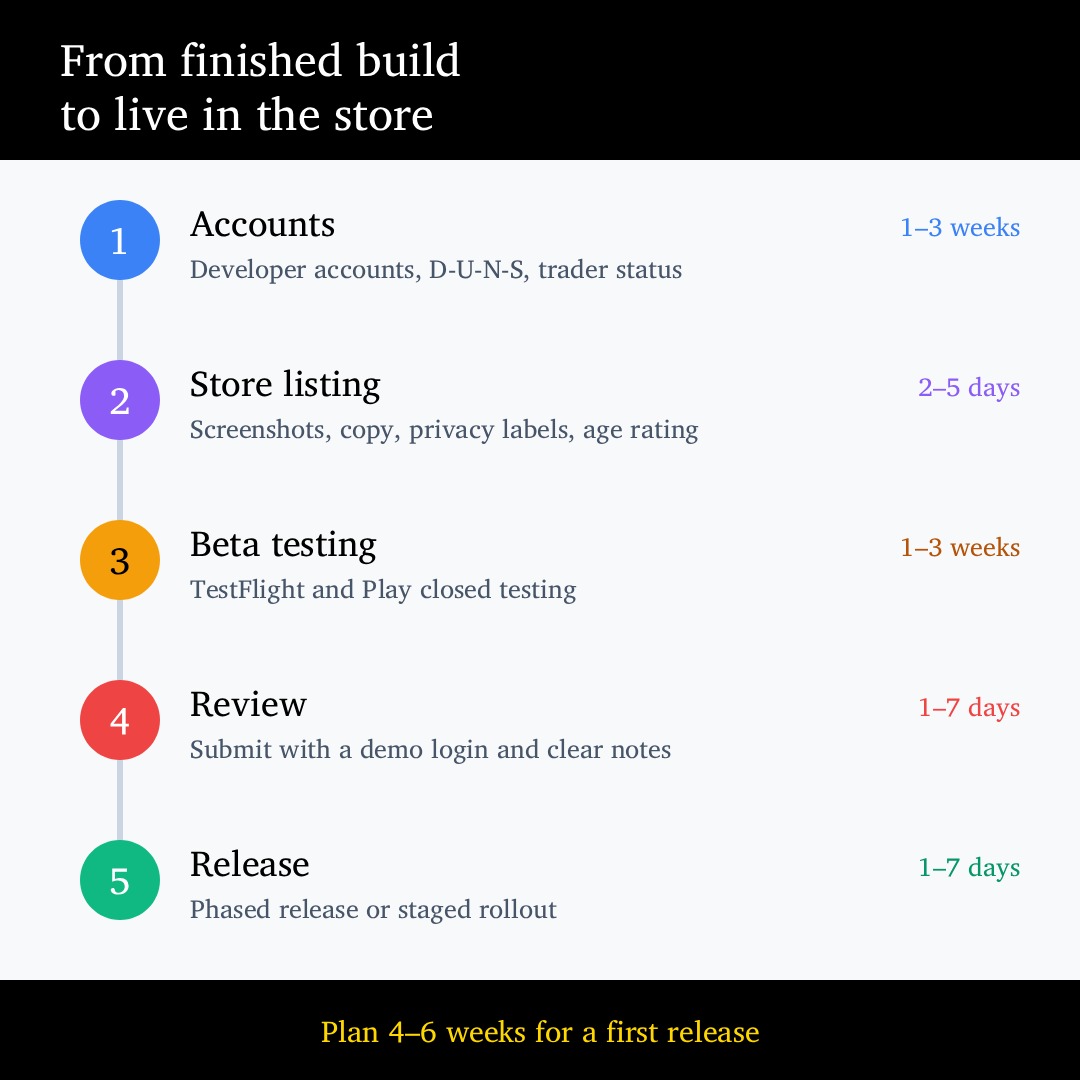
Plan for one to three weeks. Organisation verification on Apple usually takes a few days once your D-U-N-S number is active. Google’s identity and organisation verification can take a similar time. Waiting on account approval is one of the most common reasons launch dates slip, and it is entirely avoidable if you start early.
Q7: Do I need a Mac to submit to the Apple App Store?
Yes, in practice. iOS apps must be built with Xcode, which only runs on macOS. Since 28 April 2026, every upload to App Store Connect must be built with Xcode 26 and the iOS 26 SDK or later. Cloud build services can run Xcode for you, but a Mac-based build step is unavoidable.
Q8: What technical requirements does Google Play have right now?
Since 31 August 2026, new apps and updates must target Android 16 (API level 36), with extensions available to 1 November 2026. New apps must be uploaded as an Android App Bundle (.aab) rather than an APK, and use Play App Signing. Google raises the target level every year, so plan an annual update even if the app is otherwise finished.
Q9: Can I publish the same app on both stores?
Yes, and most businesses do. You submit separately to each store, with separate listings, reviews and approvals. Cross-platform frameworks such as React Native and Flutter let one codebase produce both builds, but each store still reviews the app against its own rules. An app that passes one store can still be rejected by the other.
Q10: What is the Google Play 12 testers rule?
Personal Google Play accounts created after 13 November 2023 must run a closed test with at least 12 testers opted in for 14 days in a row before they can apply for production access. Organisation accounts are exempt. This is one more reason to register as an organisation if you are publishing on behalf of a business.
Section 2: Preparing Your Store Listing (Q11–20)
Q11: What goes into a store listing?
An app name, subtitle or short description, full description, keywords (Apple), app icon, screenshots, optional preview video, category, age rating, privacy details, support URL and privacy policy URL. Treat it like a landing page. It is the first thing a potential user sees and it decides whether they tap install.
Q12: How many screenshots do I need, and what sizes?
Apple requires screenshots for the largest iPhone display size it currently asks for, plus iPad if your app supports iPad, and scales them down for smaller devices. Google Play requires at least two phone screenshots, plus a 1024 x 500 feature graphic. Check the current specifications in each console before your designer starts, because the required sizes change as new devices launch.
Q13: Can my screenshots include marketing text and design?
Yes. Captions, backgrounds and device frames are fine and usually improve conversion. What is not allowed is showing features, content or results that the submitted build does not have. Screenshots must reflect the real app. Misleading listings are a common and avoidable reason for rejection.
Q14: How long can the app name be?
Apple allows 30 characters for the name and 30 for the subtitle. Google Play allows 30 characters for the title and 80 for the short description. Keep the name clean. Stuffing it with keywords, prices or phrases like “Best” or “#1” can get your listing rejected on both stores.
Q15: Does the store listing affect search ranking in the store?
Yes. App store optimisation works a lot like SEO. On Apple, the name, subtitle and 100-character keyword field carry most of the weight. On Google Play, the title, short description and full description are all indexed. Ratings, reviews, download velocity and retention also influence ranking on both stores.
Q16: Do I need a privacy policy?
Yes, on both stores, even if your app collects very little. It must be hosted on a public URL, be specific to your app or business, and accurately describe what data you collect, why, who you share it with, and how users can exercise their rights. For an Irish business this is also a GDPR requirement. Our GDPR compliance team regularly reviews app privacy policies before launch.
Q17: What are Apple’s privacy nutrition labels?
They are the “App Privacy” section on your App Store page, showing users what data your app collects and whether it is linked to them or used for tracking. You complete them in App Store Connect. They must include data collected by third-party SDKs such as analytics, advertising and crash reporting tools, not just your own code.
Q18: What is Google Play’s Data safety section?
It is Google’s equivalent of Apple’s privacy labels. You declare what data your app collects and shares, whether it is encrypted in transit, and whether users can request deletion. Google checks declarations against the app’s behaviour, and a mismatch can lead to a warning, a blocked update or removal.
Q19: How do I set the age rating?
Both stores use a questionnaire. On Apple, you answer questions in App Store Connect about content such as violence, gambling, mature themes and user-generated content. On Google Play, you complete the IARC questionnaire, which produces ratings for each region. Answer honestly. An age rating that does not match the content is grounds for rejection or removal.
Q20: Do I need to translate my listing for other EU markets?
You do not have to, but it helps. Both stores let you add localised listings for each language. If you are targeting users in France, Germany or Spain, a translated listing will usually convert far better than an English one. You can localise the listing without translating the app itself, although users will notice if the two do not match.
Section 3: Testing Before You Submit (Q21–30)
Q21: What is TestFlight?
TestFlight is Apple’s beta testing service. You upload a build to App Store Connect and invite testers to install it through the TestFlight app. It is the standard way to get your app onto real iPhones and iPads before public release.
Q22: What is the difference between internal and external TestFlight testers?
Internal testers are members of your App Store Connect team, up to 100 people, and can test builds straight away. External testers can be anyone with an email address or a public link, up to 10,000 per app. The first build you send to external testers goes through a short beta review by Apple.
Q23: How long does a TestFlight build last?
90 days from upload. After that it expires and testers can no longer open it. If your testing phase runs longer, upload a fresh build.
Q24: What testing tracks does Google Play offer?
Internal testing for up to 100 people with almost instant availability, closed testing for invited groups or email lists, and open testing where anyone can join from your store listing. Only closed testing counts toward the 12-tester requirement for new personal accounts.
Q25: What should we test before submitting?
Every screen and every user journey on real devices running the latest operating system: sign-up, login, password reset, payments, account deletion, push notifications and offline behaviour. Test on older, smaller devices too. Reviewers use real hardware and will reject an app that crashes or has broken buttons.
Q26: Can reviewers test an app that needs a login?
Only if you give them one. Provide a working demo account in the review notes, with sample data already loaded so every feature can be seen. If the app relies on hardware, a location or a paid subscription, explain how the reviewer can see those features. A missing or broken demo login is one of the fastest routes to rejection.
Q27: What if our app depends on a back-end that is not live yet?
The back-end must be live and stable when you submit. Reviewers test the real app against real services. A staging server that goes down during review, or an API that returns errors, leads to an incomplete-app rejection. Freeze back-end changes during the review window.
Q28: How do we avoid permission-related rejections?
Only ask for permissions the app genuinely needs, ask at the moment the feature is used rather than on first launch, and write a plain explanation of why. “We use your location to show branches near you” is fine. “This app needs location access” is not. Both stores check that permission requests match what the app actually does.
Q29: Should we check third-party SDKs before submitting?
Yes. Every analytics, advertising, payment or crash-reporting SDK you include becomes part of your app in the eyes of the reviewer and the regulator. Check that each one is up to date, supports the latest OS, is declared in your privacy labels, and has a data processing agreement in place. Outdated SDKs are a common hidden cause of rejections and privacy mismatches.
Q30: Is accessibility checked during review?
Not as a formal pass or fail on most apps, but it matters. The European Accessibility Act has applied to many consumer-facing digital services in the EU since June 2025, and poor accessibility hurts ratings and reach. Test with VoiceOver on iOS and TalkBack on Android, support dynamic text sizes, and check colour contrast. Our UX/UI design team builds this into app design from the start.
Section 4: The Review Process and Rejections (Q31–40)
Q31: How long does App Store review take?
Most apps are reviewed within 24 to 48 hours. New apps, apps in sensitive categories such as health, finance or children’s content, and submissions around the major iOS release each September can take longer. Build a few extra days into any launch plan.
Q32: How long does Google Play review take?
Updates are often reviewed within hours to a couple of days. New apps and new developer accounts can take up to seven days or more, and Google sometimes extends reviews for additional checks. Google’s closed testing and production access application also add time for new personal accounts.
Q33: Can we speed up an App Store review?
Yes, in specific cases. Apple lets you request an expedited review for urgent situations such as a critical bug fix or a time-sensitive event. Use it sparingly. It is not intended for ordinary launch deadlines, and overuse can make future requests less likely to be granted.
Q34: What are the most common reasons apps get rejected?
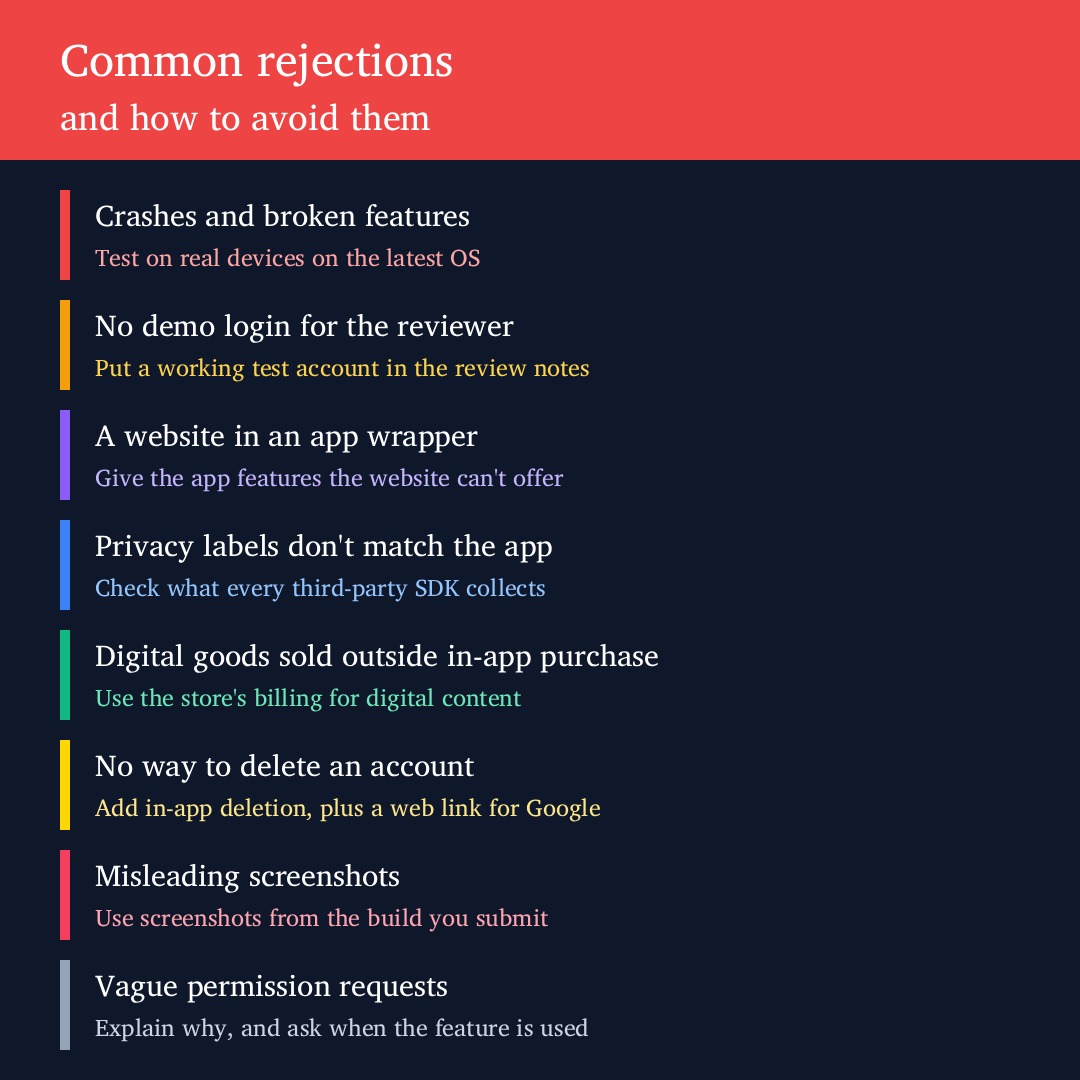
Crashes and bugs, missing demo logins, incomplete or placeholder content, privacy declarations that do not match the app, selling digital goods outside in-app purchase, missing account deletion, and apps that are little more than a website in a wrapper. Almost all of them are preventable with a checklist before submission.
Q35: What does Apple’s guideline 4.2 “minimum functionality” rejection mean?
It means Apple decided your app does not do enough to justify being an app. It is most often applied to apps that simply display a website. To pass, the app needs to offer something the website cannot, such as native navigation, offline access, push notifications, device features or a genuinely app-like experience. The full rules are in Apple’s App Review Guidelines.
Q36: When do we have to use in-app purchase?
When you sell digital content or features used inside the app, such as subscriptions, premium features, digital courses or in-app currency. Physical goods and real-world services like food delivery, taxi rides, event tickets or consultations can use your own payment system. The rules have changed in the EU under the Digital Markets Act, so check the current options for EU storefronts before you design payments.
Q37: Do we have to offer account deletion?
Yes. If your app lets users create an account, both stores require a way to delete that account from inside the app. Google Play also requires a web link where users can request deletion without reinstalling the app. Deactivation alone is not enough. For an Irish business, this also supports your GDPR obligations on the right to erasure.
Q38: What happens when our app is rejected?
Apple explains the reason in App Store Connect, citing the guideline number, and you can reply to the reviewer directly. Google sends an email and shows the policy issue in Play Console. Fix the issue, or explain why you believe the reviewer is mistaken, and resubmit. A rejection is not a penalty. It is a request to change something.
Q39: Can we appeal a rejection?
Yes. On Apple, reply to the reviewer first, as many issues are resolved with a clear explanation or screenshot. If that fails, you can appeal to the App Review Board. On Google Play, you can submit an appeal through the Policy status page in Play Console. Keep your tone factual and point to the specific guideline wording.
Q40: How do we write good review notes?
Short and practical. Include the demo login, what the app does in one or two sentences, how to reach any feature that is not obvious, and anything unusual such as hardware requirements or region-locked content. If you know a feature might raise questions, explain it before the reviewer asks. Good notes regularly save a day or more.
Section 5: Updates, Release and EU Rules (Q41–50)
Q41: Does every update go through review?
Yes, on both stores. Updates are usually reviewed faster than new apps, but they are still checked. A new feature or SDK added in an update can trigger a rejection even if earlier versions passed without issue.
Q42: Can we control when an approved app goes live?
Yes. Apple lets you release manually, automatically after approval, or on a scheduled date. Google Play offers managed publishing, which holds approved changes until you choose to publish them. This is useful when a launch needs to line up with a press release, a campaign or a website update.
Q43: What is a phased release or staged rollout?
It releases an update to a percentage of users first. Apple’s phased release spreads automatic updates over seven days. Google’s staged rollout lets you choose the percentage and increase it yourself. If crash reports or reviews show a problem, you can pause before everyone is affected. We recommend it for every significant update.
Q44: What is EU trader status and do we need to declare it?
Under the EU Digital Services Act, both stores ask whether you are a trader, meaning you publish apps as part of a business. If you are, your trader details, including address, phone number and email, are shown on your EU store listing. Apple removes apps from EU storefronts if trader status has not been declared, so every Irish business publishing apps needs to complete this.
Q45: Does GDPR affect how we publish an app?
Yes. The app store listing, privacy policy, consent flows, analytics and account deletion process all need to reflect GDPR. For Irish businesses, the Data Protection Commission is the regulator. Store approval does not mean GDPR compliance. Apple and Google check their own policies, not Irish or EU data protection law.
Q46: Who handles VAT on app sales in Ireland?
For sales through the App Store and Google Play, the stores act as the seller for VAT purposes in the EU, collecting and remitting VAT on paid apps and in-app purchases. You receive your proceeds after the store’s commission and VAT. Your accountant should still review how store payouts are recorded, particularly for subscriptions sold across several EU countries.
Q47: What commission do the stores take?
The standard rate is 30% on paid apps and in-app purchases, reduced to 15% for smaller developers through Apple’s Small Business Program and on Google Play’s first $1 million of annual earnings. Most subscriptions also drop to 15%, from day one on Google Play and after the first year on Apple. EU terms under the Digital Markets Act differ and change regularly, so check the current terms for EU storefronts before setting prices.
Q48: Can an approved app be removed later?
Yes. Apps can be removed for policy violations found after release, failing to meet new technical requirements, outdated privacy declarations, missing trader status in the EU, or long periods without updates. Google also limits the visibility of apps that fall behind on target API level. Staying approved means keeping the app maintained.
Q49: How often should we update our app to stay compliant?
At least once a year, to meet each store’s new SDK or target API requirements. Apple and Google both raise the baseline annually, and missing a deadline blocks further updates until you catch up. In practice, most business apps benefit from a planned update every one to three months for fixes, OS compatibility and small improvements.
Q50: What is the single best way to get approved first time?
Submit an app that is finished, honest and easy to review. That means real devices tested on the latest OS, a working demo login, privacy declarations that match every SDK, account deletion in place, a listing that shows the real app, and review notes that answer the reviewer’s questions before they ask. Most rejections come from skipping one of these, not from the rules being unreasonable.
If you are planning a new app or preparing a first submission, the app development team at Matrix Internet handles builds, testing, store listings and submission for Irish and European businesses, and stays on hand for the updates that keep your app live.
At Matrix Internet, our app development team takes your app from finished build to live on the App Store and Google Play. We set up the accounts, prepare the listings and privacy details, test on real devices and handle the review, so your launch date holds.
By Matrix Internet


