


BLOG
Common Website Vulnerabilities and How to Prevent Them
4 min read
Matrix is proud to join PACE, now launched in Moldova. The Erasmus+ project strengthens youth organisations across the region with training, digital resources and collaboration to support displaced Ukrainian young people.
Most websites are attacked not because they are specifically targeted, but because automated bots are continuously scanning the internet looking for known weaknesses. When they find one — an unpatched plugin, a predictable login URL, an unsanitised input field — they exploit it immediately and automatically. The site owner often does not find out until the damage is done.
Understanding the most common website vulnerabilities is the foundation of any effective cybersecurity strategy. You cannot defend against threats you do not understand, and you cannot prioritise your security investment without knowing which risks are most likely to affect a site like yours. This guide covers the six most exploited website vulnerabilities, how each one works, and — crucially — how to prevent them.
Why Website Cybersecurity Matters More Than You Think
There is a widespread and dangerous misconception that cybersecurity is a concern only for large enterprises. The data does not support this. According to the Verizon Data Breach Investigations Report, a significant proportion of cyberattacks target small and medium businesses — precisely because they are perceived as having weaker defences than larger organisations.
The consequences of a successful attack extend well beyond the immediate technical disruption. A data breach involving customer information triggers obligations under GDPR, with potential fines of up to €20 million or 4% of global annual turnover. A compromised site that serves malware to visitors will be blacklisted by Google, wiping out months of organic traffic overnight. A ransomware attack that encrypts your site’s files and database can cost more to recover from than the ransom itself — if recovery is possible at all without a clean backup.
According to IBM’s Cost of a Data Breach report, the average cost of a data breach for a small business now runs into hundreds of thousands of euros when you account for detection, response, regulatory compliance, reputational damage, and lost business. The investment required to prevent most breaches is a fraction of that figure.
The Six Most Common Website Vulnerabilities
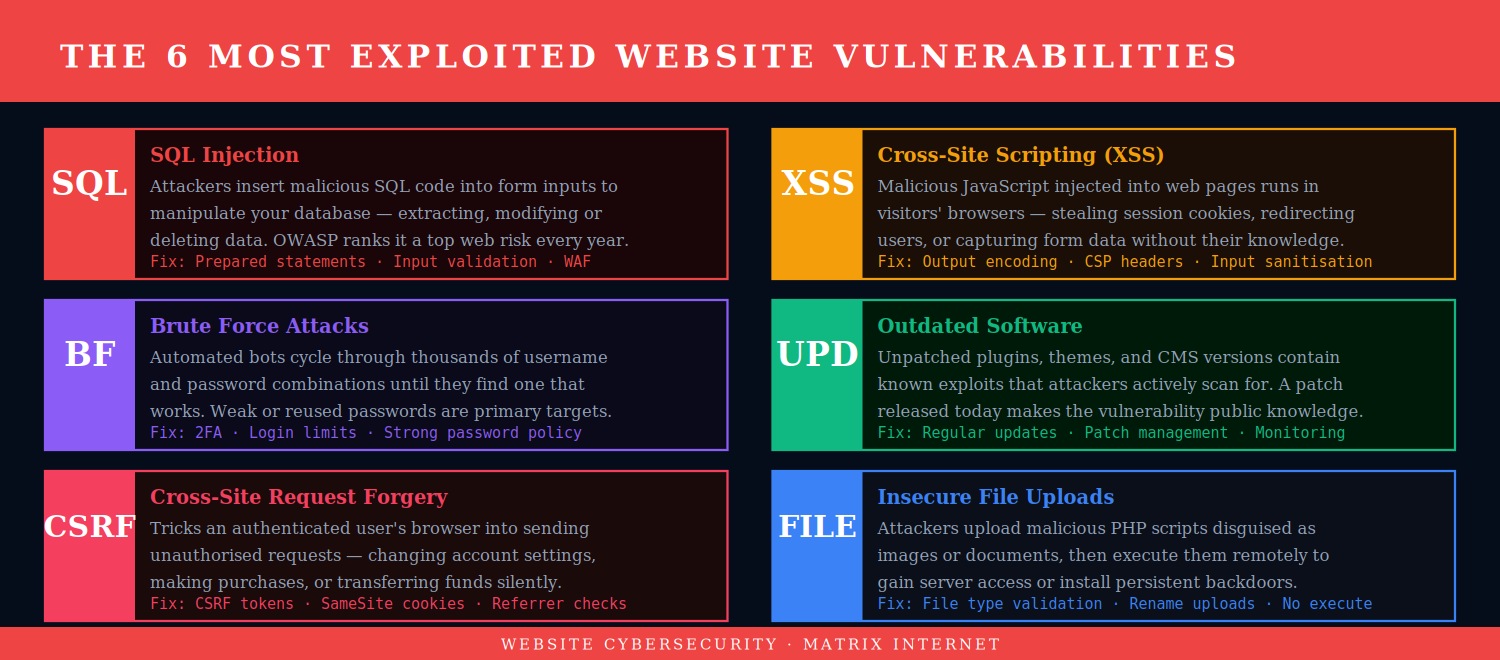
1. SQL Injection
SQL injection is one of the oldest and most persistent attack types in web security, consistently appearing in the OWASP Top 10 list of critical web application security risks. The attack works by inserting malicious SQL code into an input field — a search box, a login form, a URL parameter — that is passed directly to a database query without proper validation or sanitisation. If the database executes the malicious code, the attacker can extract, modify, or delete any data the application has access to.
A successful SQL injection attack can expose your entire customer database — names, email addresses, hashed passwords, payment information — to an attacker in seconds. In more severe cases, it can allow the attacker to write files to the server or execute operating system commands.
Prevention: The primary defence against SQL injection is the use of parameterised queries (also called prepared statements) in all database interactions — a practice that ensures user input is always treated as data, never as executable code. Input validation, the principle of least database privilege (your web application’s database user should only have the permissions it actually needs), and a Web Application Firewall (WAF) that filters known injection patterns all contribute to a robust defence.
2. Cross-Site Scripting (XSS)
Cross-Site Scripting attacks involve injecting malicious JavaScript into web pages that are then served to other users. Unlike SQL injection, which targets the server, XSS targets the visitors to the site. When a user loads a page containing injected malicious script, that script runs in their browser — with access to their session cookies, their keystrokes, and anything they type into the page.
XSS attacks are used to steal session tokens (allowing an attacker to impersonate a logged-in user), redirect visitors to phishing pages, capture form data including passwords, and deliver malware. They are particularly dangerous on sites where users can post content — comments, reviews, forum posts — that is then displayed to other users.
Prevention: All user-generated content must be output-encoded before being rendered in the browser — this ensures any injected HTML or JavaScript is treated as text rather than code. A Content Security Policy (CSP) header tells browsers which scripts are authorised to run on your pages, blocking the execution of injected scripts even if they make it past input validation. Input sanitisation on the server side provides a second layer of defence.
3. Brute Force and Credential Attacks
Brute force attacks use automated tools to cycle through vast numbers of username and password combinations until they find one that works. Modern credential stuffing attacks take this further — using databases of username and password pairs leaked from previous breaches on other services, on the assumption that many people reuse passwords across multiple accounts. Given that billions of credentials are available in breach databases, this assumption is frequently correct.
Once inside your admin dashboard, an attacker can install malicious plugins, redirect your traffic, steal customer data, or lock you out entirely. Admin account compromise is one of the most common entry points for serious WordPress site attacks.
Prevention: Two-factor authentication is the single most effective defence against credential attacks — even a correct password is useless without the second factor. Login attempt limiting (locking out an IP address after a small number of failed attempts) stops automated brute force tools before they can make meaningful progress. Strong, unique passwords managed through a password manager remove the risk of credential reuse. Changing the default login URL away from /wp-admin reduces automated bot traffic to the login page.
4. Outdated Software and Unpatched Vulnerabilities
Running outdated software is not a passive security state — it is an active vulnerability. When a security researcher discovers a flaw in a WordPress plugin and reports it to the developer, the developer patches it and releases an updated version. The moment that update is released, the vulnerability becomes public knowledge. Any site still running the old version is now knowingly exposed to a known, publicly documented attack.
Attackers maintain automated scanners that continuously probe sites for outdated software versions. A site running a plugin with a known vulnerability will typically be attacked within hours of the vulnerability being disclosed — not days or weeks. According to Patchstack’s WordPress security research, the overwhelming majority of WordPress vulnerabilities discovered each year are in plugins and themes rather than in core.
Prevention: Keep all software current — WordPress core, plugins, and themes — as a non-negotiable maintenance priority. Apply security patches immediately; schedule major version updates for a dedicated testing session on a staging environment. Remove plugins and themes you are not actively using. Use a security scanning tool to identify vulnerabilities in installed software before attackers do. For a structured approach to safe updates, see our guide on how to update WordPress plugins safely.
5. Cross-Site Request Forgery (CSRF)
CSRF attacks exploit the trust that a web application places in an authenticated user’s browser. When you are logged into a website, your browser automatically includes authentication credentials with every request it makes to that site. A CSRF attack tricks your browser into making a request you did not intend — by embedding a malicious link or form in another page you visit while logged in.
For example: an attacker sends you a link to an innocent-looking page. Hidden on that page is a form that silently submits a request to change your email address or transfer funds on a banking site where you are currently logged in. Your browser sends the request with your authentication credentials, the server sees a legitimate authenticated request, and the action is completed — without you having initiated it.
Prevention: CSRF tokens are the standard defence — a unique, unpredictable token included in every form submission that the server validates before processing the request. A forged request from another site will not include the correct token and will be rejected. SameSite cookie attributes prevent browsers from sending cookies with cross-site requests. Modern frameworks and CMSs like WordPress include CSRF protection by default through the nonce system — but custom code that bypasses this system is a common source of CSRF vulnerabilities.
6. Insecure File Uploads
Many websites allow users to upload files — profile pictures, document attachments, portfolio images. An insecure file upload mechanism is one that can be tricked into accepting a file type it should reject — specifically, a PHP script disguised as an image. If an attacker can upload a PHP file to your server and access it via a URL, they can execute arbitrary code on your server, establishing persistent access, installing backdoors, or exfiltrating data.
Prevention: Validate file types on the server side — not just by checking the file extension (which can be faked), but by inspecting the actual file content (MIME type checking). Rename uploaded files to remove any executable extension. Store uploaded files outside the web root where possible, so they cannot be directly accessed via URL. Configure your server to not execute scripts in upload directories. Set strict file permissions on upload folders.
How a Cyberattack Unfolds — and Where to Stop It
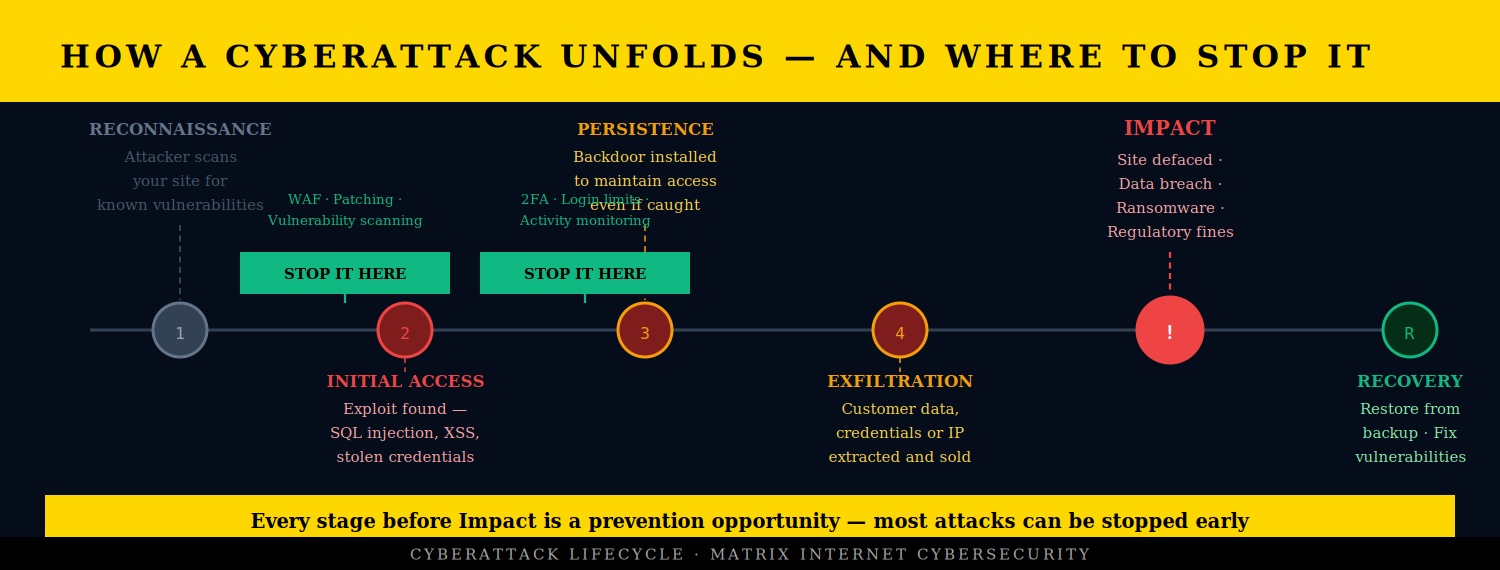
Understanding the stages of a cyberattack helps clarify where prevention efforts have the most impact. Most attacks follow a predictable progression: reconnaissance, initial access, establishing persistence, moving laterally through the system, extracting data, and finally causing visible impact — whether that is defacement, ransomware, or a data breach.
The critical insight is that most attacks can be stopped at the early stages. The reconnaissance phase, where automated bots scan your site for vulnerabilities, can be disrupted by a WAF that identifies and blocks scanning traffic. The initial access phase can be prevented by patching vulnerabilities before they are exploited and by implementing strong authentication. The persistence phase — where an attacker installs a backdoor — can be detected by file integrity monitoring and regular security scanning.
The later in the attack lifecycle an intrusion is detected, the more damage has already been done and the more expensive recovery becomes. Early detection and early prevention are the defining factors in whether a cybersecurity incident is a minor disruption or a major business event.
A Cybersecurity Prevention Checklist
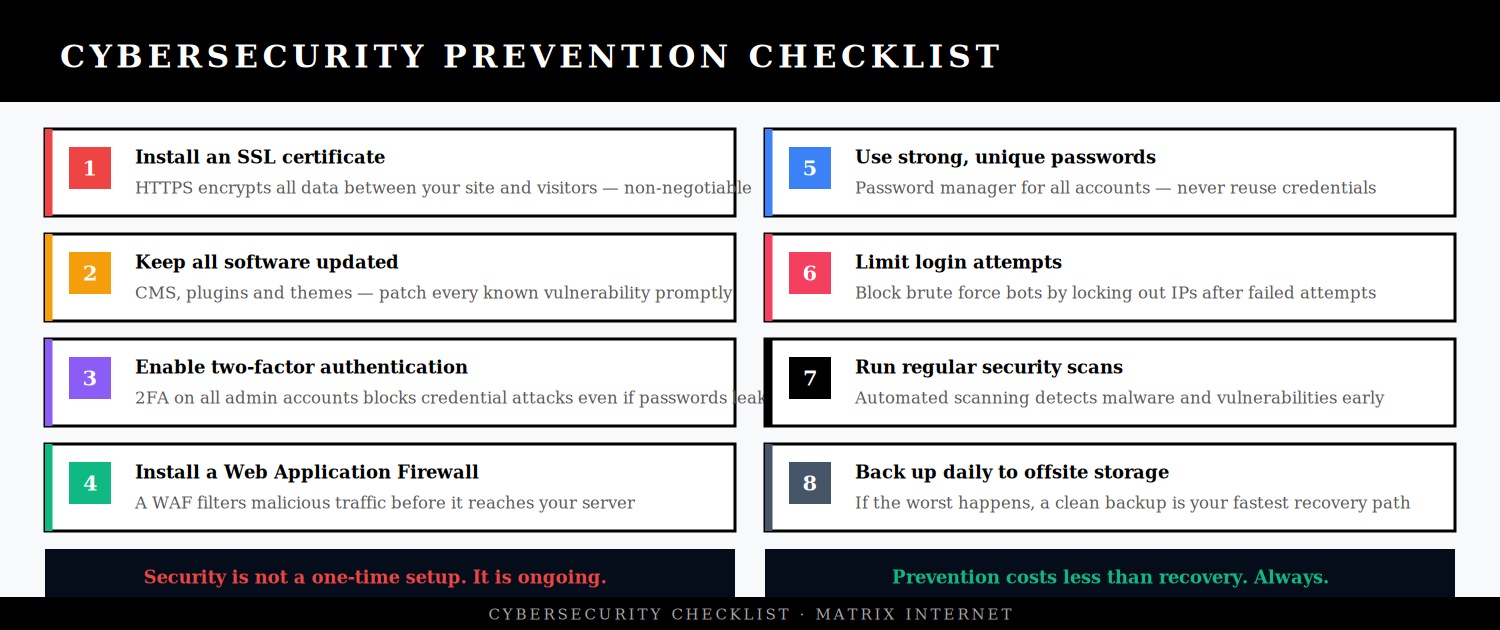
The following measures address the majority of common website vulnerabilities and represent the baseline cybersecurity posture that every business website should maintain:
Install and maintain a valid SSL certificate. HTTPS encrypts all data transmitted between your site and your visitors, preventing interception of login credentials, form data, and session tokens. It is also a Google ranking signal and a baseline trust signal for visitors. Let’s Encrypt provides free SSL certificates; most managed hosting providers include SSL as standard.
Keep all software updated promptly. Apply security patches as soon as they are released. Schedule major updates for a staging environment. Remove software you are not using. This single measure prevents the majority of successful attacks against WordPress sites.
Enable two-factor authentication on all admin accounts. 2FA is the most effective single measure against account compromise. Even if credentials are stolen or guessed, 2FA means they cannot be used without physical access to the authenticator device. Use an authenticator app rather than SMS where possible, as SMS 2FA is vulnerable to SIM-swapping attacks.
Install a Web Application Firewall. A WAF filters incoming traffic and blocks requests that match known attack patterns — SQL injection attempts, XSS payloads, scanning traffic, and more. Cloudflare’s WAF is available on the free tier; Wordfence and Sucuri provide WordPress-specific WAF options.
Limit login attempts. Configure your site to lock out IP addresses after a small number of failed login attempts. This stops brute force attacks at the login page before they can make meaningful progress. On WordPress, plugins like Limit Login Attempts Reloaded implement this in minutes.
Run regular security scans. Automated security scanning tools — Wordfence, Sucuri, Sucuri SiteCheck for free scanning — detect malware, suspicious file changes, and known vulnerabilities before they are actively exploited. Schedule scans weekly and review the results.
Use strong, unique passwords across all accounts. A password manager generates and stores complex passwords so that every account has a unique credential. Credential reuse is one of the most common causes of account compromise — a password leaked from one breach is tested against every other service that person might use.
Back up daily to offsite storage. In the event of a successful attack, a clean recent backup is your fastest path to recovery. Without one, you may be facing a complete rebuild. Configure automated daily backups to a remote location — Google Drive, Amazon S3, or a dedicated backup service — and test the restore process periodically to confirm backups are functional.
HTTPS, Headers, and Server-Level Security
Beyond application-level security, several server and configuration measures significantly reduce your attack surface:
HTTP security headers tell browsers how to handle your site’s content and protect against a range of attack types. The most important headers for web security are: Content-Security-Policy (prevents XSS by specifying which scripts are authorised), X-Frame-Options (prevents clickjacking by blocking your site from being embedded in iframes), X-Content-Type-Options (prevents MIME type sniffing), and Strict-Transport-Security (enforces HTTPS). You can check your current security header configuration at securityheaders.com.
File permissions on your server should follow the principle of least privilege — files and directories should have only the permissions required for the application to function. WordPress directories should be set to 755 and files to 644. wp-config.php should be 440 or 400. Overly permissive file permissions are a common enabling factor in attacks that might otherwise have been contained.
Database security — your web application should connect to the database using a dedicated user with only the permissions it needs (SELECT, INSERT, UPDATE, DELETE on its own tables), not a root or admin database user. Using a non-standard database prefix (changing WordPress’s default wp_ to something site-specific) adds a minor additional barrier to SQL injection attacks.
What to Do If You Suspect Your Site Has Been Compromised
The immediate priority if you suspect your site has been compromised is containment and evidence preservation. Do not delete suspected malicious files before documenting them — you may need them for a security investigation or regulatory reporting. Take the site offline if it may be serving malicious content to visitors. Take a snapshot of the affected state before beginning remediation.
Run a full security scan with Wordfence or Sucuri to identify the scope of the compromise. Check server access logs for the time of initial access and the IP addresses involved. Identify which vulnerability was exploited — this is essential for closing it before restoring the site, or the attacker will simply return through the same door.
If customer data may have been accessed, GDPR requires you to notify the relevant data protection authority within 72 hours of becoming aware of the breach, and to notify affected individuals if the breach is likely to result in a high risk to their rights and freedoms. This is a compliance obligation, not an optional step.
For detailed guidance on recovering a compromised site, see our complete guide on how to recover a hacked website.
Summary
The most common website vulnerabilities — SQL injection, cross-site scripting, brute force attacks, outdated software, CSRF, and insecure file uploads — are well understood, well documented, and preventable. The businesses that get breached are not usually the ones that were specifically targeted and overwhelmed by sophisticated attackers. They are the ones that skipped the basics: an unpatched plugin, a weak password, no two-factor authentication, no WAF.
Cybersecurity does not require a large budget or a dedicated security team. It requires consistent, informed practice — keeping software current, enforcing strong authentication, validating all user input, scanning regularly, and backing up daily. These measures, applied consistently, make your site a substantially harder target than the majority of sites on the internet. Most automated attacks will move on to easier targets.
If you want an expert review of your site’s security posture — identifying vulnerabilities before attackers do and putting the right protections in place — the technical support team at Matrix Internet provides cybersecurity assessments and ongoing security monitoring for business websites. Get in touch to find out what your site’s current exposure looks like.
At Matrix Internet, our cybersecurity team identifies vulnerabilities in your website before attackers do — assessing your security posture, implementing the right protections, and monitoring your site continuously so threats are caught and neutralised before they cause damage.
FAQs
The most common entry point for website attacks is outdated software — specifically unpatched plugins, themes, and CMS versions with known, publicly documented vulnerabilities. Once a security patch is released, the vulnerability it fixes becomes public knowledge, and automated bots begin scanning for sites still running the old version within hours. The second most common entry point is weak or reused credentials, where brute force tools or credential stuffing attacks gain access to admin accounts. Both of these are entirely preventable with consistent maintenance and strong authentication practices.
SQL injection is an attack where malicious database commands are inserted into input fields — search boxes, login forms, URL parameters — that pass user input directly to a database query without proper validation. If your site runs custom code or older plugins that do not use parameterised queries, it may be vulnerable. You can test for surface-level exposure using a free scan at Sucuri SiteCheck or run a full vulnerability assessment with a tool like WPScan. However, for a thorough assessment of your site's SQL injection exposure, a professional security audit is the most reliable approach — automated surface scanners only catch a fraction of potential vulnerabilities.
An SSL certificate means the connection between your site and your visitors is encrypted — it does not mean your site is secure against attacks. SSL prevents data interception in transit, which is important and necessary, but it does nothing to protect against SQL injection, XSS, brute force attacks, malware infections, or any of the other vulnerabilities covered in this guide. A site with a valid SSL certificate can still be hacked, can still serve malware, and can still expose customer data through application-level vulnerabilities. SSL is one layer of a multi-layered security posture, not a substitute for it.
For most business websites, a weekly automated security scan is the minimum appropriate cadence. Scanning tools like Wordfence and Sucuri can be configured to run on a schedule and alert you by email when they detect suspicious files, known malware signatures, or changes to core files. In addition to scheduled scans, run a manual scan immediately after any plugin or theme update, after any new user is added to the admin panel, and any time you notice unusual site behaviour such as unexpected redirects, new content you did not create, or a sudden drop in search traffic. For high-traffic or ecommerce sites, continuous real-time monitoring is the more appropriate standard.
The immediate priorities are containment and evidence preservation. Take the site offline if it may be actively serving malicious content to visitors — this limits both the damage to visitors and the reputational harm to your brand. Do not delete suspicious files before documenting them, as you may need them for investigation or regulatory reporting. Run a security scan to identify the scope of the compromise, and check your server access logs to establish when and how the attacker gained access. If customer data may have been exposed, GDPR requires notification to your data protection authority within 72 hours. Once you have a clean backup to restore from, close the vulnerability that was exploited before bringing the site back online — or the attacker will simply return through the same door.
By Srdjan


